


Our Courses
All Courses

Course Library View the full range of courses

Start with these learner favorites

Complete Teaching Assistant Diploma (TA, SEN, Autism, ADHD & Dyslexia)
11 hrs, 28 mins 3389
Microsoft Excel Complete Course – Beginner Intermediate & Advanced
11 hrs, 6 mins 1953
British Sign language (BSL) Level 1 Online Course
4 hrs, 43 mins 1738

Python GUI Development with Tkinter: Build Pro Desktop Apps!

Master Python GUI development with Tkinter to build professional, user-friendly desktop apps. Enhance your skills in crafting responsive, standout interfaces.

(2556 Reviews)

7766

Students

GET THIS COURSE AND 3000+ OTHERS FOR ONLY £49 PER YEAR. FIND OUT MORE

Imagine transforming your Python scripts into sleek, interactive desktop applications that users can’t wait to engage with. That’s exactly what you’ll be doing in this exciting journey through Python GUI Development with Tkinter: Build Pro Desktop Apps course.

This course isn’t just about learning – it’s about creating. From day one, you’ll learn how to craft vibrant user interfaces that bring your code to life. Ever wondered how to build those cool dropdown menus or sliding scales you see in professional apps? We’ve got you covered. In this  Python GUI Development with Tkinter: Build Pro Desktop Apps course, you’ll master everything from simple buttons to complex canvases where you can let your creativity run wild.

But here’s where it gets really interesting: we’re not just throwing widgets at you. You’ll learn the art of UI design, discovering how to give each element its own personality. And let’s talk about layout – it’s like solving a fun puzzle. You’ll become a pro at arranging your widgets using three different techniques, ensuring your app looks perfect on any screen. By the end of this  Python GUI Development with Tkinter course, you won’t just be a Python programmer – you’ll be a desktop app wizard.

Enrol now in our Python GUI Development with Tkinter: Build Pro Desktop Apps course and start turning those lines of code into stunning, functional apps that will make jaws drop.

Learning Outcome

After completing this Python GUI Development with Tkinter: Build Pro Desktop Apps course you will be able to : 

Create interactive desktop applications using Python and Tkinter.

Build a fully functional calculator app, applying all learned concepts in a real-world project.

Master a wide range of Tkinter widgets for building diverse user interfaces.

Design visually appealing UIs by customizing widget attributes and styles.

Implement efficient layouts using pack, grid, and place geometry managers.

Develop advanced GUI features like menus, scrollbars, and pop-up windows.

Entry requirements

To enrol in Python GUI Development with Tkinter: Build Pro Desktop Apps, you must be at least 16 years old with a basic understanding of Python. No prior experience in data visualization is required, but familiarity with data analysis concepts will be beneficial. This course is designed for beginners and professionals alike.

Assessment

To assess your learning, you will take an automated multiple-choice exam, requiring a minimum score of 60% to pass and qualify for CPD accredited certificates. Upon passing, you can apply for your certificate.

Additionally, to deepen your understanding and further evaluate your progress, you are encouraged to complete the assignment questions at the end of the course. These can be done at your convenience, and once submitted, an expert tutor will review your assignment and provide feedback on your performance.

Accredited Certification
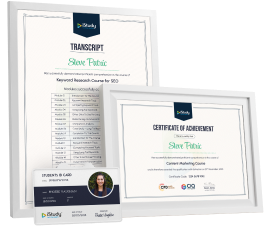
 

After successfully completing the Python GUI Development with Tkinter: Build Pro Desktop Apps course, you will be able to get the internationally accepted certificate to share your achievement with potential employers or include it in your CV.

Career Path

Desktop Application Developer

Software UI/UX Designer

Python Full-Stack Developer

Automation Engineer

Educational Software Developer

Data Visualization Specialist

Course content

8 Sections 36 lectures 2 hours 36 mins in total

Certification

After successfully completing the course, you will be able to get the and internationally accepted certificate to share your achievement with potential employers or include it in your CV.

Student Reviews

Excellent

5 Average 75 Reviews

star Reviews

Amelia Stark
📍Bristol
Great learning experience with iStudy. Clear lessons and easy to follow. Really impressed.
Lucy Thompson
📍Sheffield
Loved the flexibility. Studied at my own pace and finished quickly.
Oliver Bennett
📍Manchester
Excellent course quality. I feel more confident in my skills now.
David Smith
📍Leeds
iStudy delivered exactly what I needed. Very smooth process.
Thomas Wright
📍Portsmouth
Customer support was fast and helpful. Got answers straight away.
Paul Hughes
📍Nottingham
Great platform. Well-structured lessons and simple navigation.
Andrew Carter
📍Cardiff
Really happy with the experience. The certificate arrived quickly.
Daniel Phillips
📍Sheffield
Clear teaching style and easy to understand. Highly recommend.
Matthew Mitchell
📍Liverpool
Self-paced learning was a huge benefit. Finished around my schedule.
Joseph Kelly
📍Glasgow
Great value for money. Quality courses and helpful support.
Jacob Evans
📍Southampton
I enjoyed learning with iStudy. Everything was straightforward.
Nuhin Hughes
📍Leicester
Quick, simple and informative. Made studying stress-free.
Freddie Brown
📍Portsmouth
Fantastic support team. They resolved my issue in minutes.
Leo Robinson
📍York
Course material was clear and engaging. Very happy overall.
Theodore Wright
📍Derby
Loved the layout and simple step-by-step lessons.
Oscar Scott
📍Coventry
Prompt certificate delivery. Really impressed with the service.
Archie Murphy
📍Newcastle
Good quality courses and easy platform to use.
Alam Hill
📍Reading
Very convenient. Learned at my own pace without pressure.
Samuel Patel
📍Swansea
Great experience from start to finish. Worth every penny.
Joshua Cook
📍Brighton
Clear content, supportive team and fast responses. Highly recommend iStudy.
Frequently Asked Question
Are there any prerequisites for taking the course?
There are no specific prerequisites for this course, nor are there any formal entry requirements. All you need is an internet connection, a good understanding of English and a passion for learning for this course.
Can I access the course at any time, or is there a set schedule?
You have the flexibility to access the course at any time that suits your schedule. Our courses are self-paced, allowing you to study at your own pace and convenience.
How long will I have access to the course?
For this course, you will have access to the course materials for 1 year only. This means you can review the content as often as you like within the year, even after you've completed the course. However, if you buy Lifetime Access for the course, you will be able to access the course for a lifetime.
Is there a certificate of completion provided after completing the course?
Yes, upon successfully completing the course, you will receive a certificate of completion. This certificate can be a valuable addition to your professional portfolio and can be shared on your various social networks.
Can I switch courses or get a refund if I'm not satisfied with the course?
We want you to have a positive learning experience. If you're not satisfied with the course, you can request a course transfer or refund within 14 days of the initial purchase.
How do I track my progress in the course?
Our platform provides tracking tools and progress indicators for each course. You can monitor your progress, completed lessons, and assessments through your learner dashboard for the course.
What if I have technical issues or difficulties with the course?
If you encounter technical issues or content-related difficulties with the course, our support team is available to assist you. You can reach out to them for prompt resolution.
A developer sits at a desk with multiple screens displaying code while holding a tablet with a green screen, working on a Python GUI development project using Tkinter.
Original price was: $235.25.Current price is: $37.62.
SAVE Upto 84% - Ends Soon!
timer
Access
01 Year
Level
Intermediate
Course Duration
2 hours, 36 minutes
TAKE THIS COURSE

or

offer All courses now £49 £249

14-Day Money-Back Guarantee

top
Select your currency
AUD Australian dollar